BusinessObjects Topics

Search This Blog

BusinessObjects Topics

Thursday, November 27, 2014

Resolving Loops in a Universe

Define what a Loop is
Detect and recognize loops in Universe
Using Aliases and Contexts to resolve the loops
Identify when in the design process you resolve loops
Be able to use shortcut joins and know when to use them as alternative for resolving loops.
Be able to resolve recursive table structure loops.


A loop exists when the joins between tables form a continuous path

Three automated routines can be used to resolve most loop situations in the universe structure window.

1. Must be first Cardinality Detection
2. Alias Detection routine
3. Context Detection routine.

Click the Detect cardinalities or you can set manually also.

What is an Alias?
• An Alias is an exact duplicate of the original table with a new name. The data in the table is exactly the same.

• The Alias is used only to resolve the loop in the structure of the universe. There is no impact on the schema of the database
– Easy to define
– Easy to maintain
– Easy to use

• A loop with a single lookup table should be resolved by an alias
• A lookup table can be identified by its cardinality
• A lookup table only has the ‘one’ end of joins attached to it
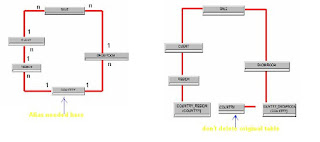


Designer routines detect loops and candidates for aliases.


Break the loop by creating an alias of the lookup table for each side of the loop.
Some DBs require a separate alias for both sides of the loop.

After that you can detect loop once again,
Alias detection routine
You can use automatic loop detection also,

Click the Detect loops button, it will be identifies loops are exist or not
You can get the message in Loop detect window and it suggest to candidate contexts or aliases

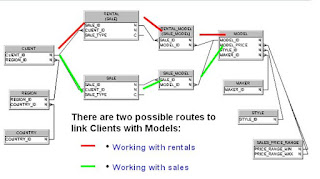
If it is structure multi star situation it not possible using alias.
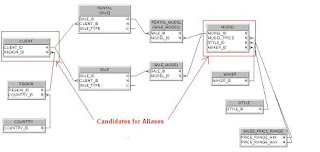


Normalized dimensions are not amenable to loop resolution using Aliases

• If you try to resolve the loop using Aliases:
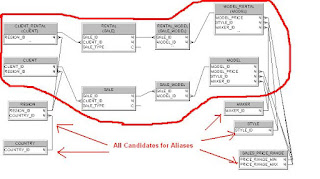


And also we get duplicate of objects
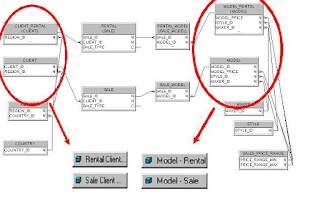


This will be effective sales universe Rentals universe

In this case we can use to resolve with contexts.


after result look like this way.


Detecting and create context.
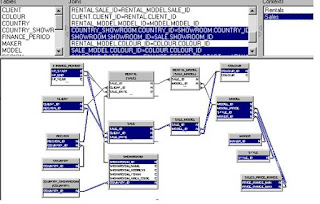

Double click the context in the list mode window

- give it context name
- if want write any description to update description this will be user


Read more »

Introduction to Semantic Layers

Introduction to Semantic Layers
The semantic layer is a metadata layer that abstracts the complexities of the data source. The end user sees only a logical grouping of available, well-named fields for use and does not have to concern them with the details of database design or need any SQL knowledge.
In Business Objects XI, two semantic layers are supported business views and universes. With the merging of Crystal Decisions and Business Objects, a decision was made to keep business views from Crystal Decisions and universes from Business Objects.
Why Use a Semantic LayerSemantic layers offer wonderful advantages over traditional report design processes by removing the most difficult data-intensive tasks, as described in the following sections, from report design. Furthermore, it allows for reuse of components and promotes the concept of changing a component once and having the change applied to multiple reports.
Abstract the Complexities of the DatabaseWith large complex data warehousing projects using many tables and complex joins, the report author might not have the requisite knowledge. If the report author is required to join the tables for the reports, he might not use the most efficient join, resulting in poor performance. Semantic layers allow for a division in labor, whereby the more technical database administrators and developers can create the joins between tables and data sources and the business users can concentrate on designing reports to satisfy their requirements.
Putting Report Design in the Hands of Business People
As a result of this division of labor and the reuse of the Business Objects repository, business people do not have to be as technically savvy, effectively resulting in less technical skill being required to develop reports.
Support for a Wide Range of Data Sources
Both metadata layers provide a wide range of database support, including the majority of relational database vendors. Business views also include the ability to connect to some no relational data sources; for example, a user could abstract the complexity of an XML file by encapsulating the XML with a business view.
Reuse of Metadata Components
One major drawback to specifying the data joins in each report is that this creates a large amount of redundant work. Secondly, should the database change, there is no way to effect this change other than changing each of the individual reports. A semantic layer allows the administrator to create this join once and should this join change, the administrator only needs to change it once.
Security
The semantic layer allows the administrator to set up security so that data is filtered based on who the user is. This can be based off of security within an entitlements database, or the Business Objects user model can be used to create the security model. This way rows and columns can be secured by users or groups.
The Business Objects repository also secures the semantic layers and only those users with the required permissions can access them. For example, it is generally accepted auditing practice that accounts receivable personnel should not be able to see accounts payable information and vice versa. By using the user group functionality in Business Objects Enterprise, the accounts receivable group would be given access to only the accounts receivable semantic layer.
TransportabilityThe semantic layers provide the ability to export a business view to an XML file or a universe to an .unv file. These files can then be easily imported into another Business Objects Enterprise repository. This simple form of transportability makes semantic layer swapping a simple exercise. It also simplifies the storage of source code, should the organization have a source code storage requirement.

Read more »

Saturday, February 11, 2012

Can a Universe connect to multiple databases?

No. Universe will connect to only one database.

How do you define universe parameters?
The first step in creating a universe is to specify its parameters. These parameters include the definition of a universe, which is comprised of: the universe name, a description of the universe, a connection to an RDBMS. You enter universe parameters from the Universe Parameters dialog box. This dialog box also lets you set up database options, external strategies, graphic options, and print settings.

What is a database connection?
A connection is a set of parameters that provides access to an RDBMS. These parameters include system information such as the data account, user identification, and the path to the database. Designer provides three types of connections: secured, shared, and personal.

Read more »

What is a universe?

Universe provides a semantic layer between you and the database. It consists of classes and objects named in business terms. It is basically a mapping of table and the columns in the database to classes and objects respectively in the query panel.
Alternatively, It is logical mapping of data in business terms.

In the BusinessObjects User module, universes enable end users to build queries from which they can generate and perform analysis. Universes isolate end users from the complexities of the database structure as well as the intricacies of SQL syntax.

Read more »

What is a macro?

A macro is a series of commands and functions that are stored in a Visual Basic for Applications module and can be run whenever you need to perform the task. If you perform a task repeatedly, you can automate the task with a macro. You create macros using the Visual Basic Editor.

Read more »

What are Enterprise and Workgroup modes?

Designer lets you save universes in either enterprise or workgroup mode. Enterprise mode means that you are working in an environment with a repository. Workgroup mode means that you are working without a repository. The mode in which you save your universe determines whether other designers are able to access them. By default, a universe is saved in the mode in which you are already working. For example, if you launched a session in enterprise mode, any universe you save is automatically in that mode.

Read more »

What is ‘business objects’?

BUSINESSOBJECTS is an integrated query, reporting and analysis solution for business professionals that allow them to access the data in their corporate databases directly from their desktop and present and analyze this information in a BUSINESSOBJECTS document.
It is an OLAP tool that high-level management can use as a part of a Decision Support Systems (DSS).

BUSINESSOBJECTS makes it easy to access the data, because you work with it in business terms that are familiar to you, not technical database terms like SQL.

Read more »

Tuesday, December 20, 2011

Using functions, formulas and calculations in Web Intelligence

Details for Business Objects XI 4.0 - Using functions, formulas and calculations in Web Intelligence
Description:
This guide tell about how use functions, formulas in Calculations i.e Variables how to use in Web Intelligence and syntax for functions

Read more »

Tuesday, November 29, 2011

What is the Central Management Console?

What is the Central Management Console?


The Central Management Console (CMC) allows you to create and manage BusinessObjects Enterprise(BOE) users and groups. It also enables you to publish organize, and set security levels for all of your BusinessObjects Enterprise content, the CMC enables you to manage servers and create Server groups.

Note: The CMC is different from the Central Configuration Manager (CCM) in that the CMC is web based. Because the CMC is web-based application, you can perform all these administrative tasks remotely.

You can perform administrative tasks in the CMC such as:

• Creating and managing users and groups, including their rights to folders, objects and applications.
• Publishing, scheduling and managing Webi Reports, Crystal, Deski, OLAP files as well as third-party documents and hyperlinks.
• Managing Universes and Universe connections.
• Managing Performances Management applications.
• Modifying BusinessObjects Enterprise applications.

Read more »

Sunday, March 13, 2011

Web Intelligence SP2: Input Controls

Web Intelligence SP2: Input Controls
With the release of XI 3.1 SP2 came quite a few new features for Web Intelligence. For the next few weeks, I will be presenting and discussing the features. In addition, I will try to provide my opinion on how the features can be used to improve the interactions with users (of the casual and power variety). For this post, I will be focusing on the new Input Controls available with Web Intelligence.

What are Input Controls?
The Web Intelligence input controls provide a quick and easy way for users to filter the content that is displayed within a Web Intelligence document. The use of filtering for a user allows them to not only cut through the information to get to what is important, but also aids the user in analyzing the information before them by determining insights that were not previously visible before a filter occurred. For example, if I am looking at a report that shows me all sales revenue by quarter and year for my many store locations then it is likely that I am not going to get to the information that I need quickly. I could use an input control available within the report to quickly filter the displayed content down to a specific year, quarter, region, or store. You could also use an input filter applied to a measure. This would allow you to use a slider control to easily see how the measure changes over time.

How do Input Controls work?
The screenshot below shows a report that displays all of the stores from the eFashion Universe with their 2005 sales revenue values in a table format. This report has been filtered using an Input Control.
more details.. Web Intelligence : Input Controls

Read more »

Saturday, March 5, 2011

Business Objects Administration SP2

Check out this SlideShare Presentation:

Read more »

Wednesday, March 2, 2011

Monday, February 7, 2011

Benefits of a Data Warehouse

Read more »

What is META DATA?

what is META DATA
visit our new blog www.businessobjects-sapbo.blogspot.com


Read more »

What is OLAP?

What is OLAP
Visit our new site www.businessobjects-sapbo.blogspot.com

Read more »

What are Dimensions and Measures?

Read more »

Sunday, January 2, 2011

Sneak Preview Demo for SAP BusinessObjects 4

Read more »

The Future for SAP Business Intelligence

Read more »

Tags